www.enhencer.com
Turn Data to Profit in Minutes
Predict customer's behavior with the most practical Automated Machine Learning platform.

www.enhencer.com/churn-prediction
Churn Prediction
Focus only on 5% of your customers who are 90% likely to leave.Know who they are and how they behave.Take the right actions to the right customers at the right time by decreasing your marketing costs.

www.enhencer.com/purchase-propensity
Predict Purchase Propensity
Increase the positive return of such campaigns up to 90% and learn why and how the marketing campaigns are made effective against which customer group.

Showing posts with label QlikView. Show all posts

Thursday, April 27, 2017

Qlikview to Tableau Migration

Tableau is one of the most popular Business Intelligence software in the market today. Many organizations are adapting Tableau recently and trying to migrate from their old Business Intelligence platform to Tableau. In this post, we will focus on QlikView to Tableau migration.

Effort needed to migrate from QlikView to Tableau depends on the way your QlikView software is implemented. In some cases, the data needed for QlikView Dashboard is completely prepared in a 3rd party tool so when migrating to Tableau, you do not need to convert ETL (extraction - transformation - load) code. But in most cases, ETL for QlikView is implemented using Qlik's own query language, AQL (QlikView is based upon patented technology called Associative Query Logic (AQL)).

Tableau does not provide a native ETL functionality so when migrating from QlikView to Tableau, you will probably need a 3rd solution to implement ETL for Tableau.

The exception above is of course keeping QlikView for ETL and just converting QlikView in-memory data to Tableau's native data set, TDE. But this usually involves, keeping two software licenses under maintenance.
Qlikview to Tableau Migration
QlikView to Tableau Migration
So usually, Qlikview to Tableau migration requires :
1 - Selecting an ETL tool to migrate QlikView AQL code to
2 - Migrating QlikView AQL code to new ETL logic
3 - Reimplementing the dashboards

Yes, there is no product/tool that does automatic migration from Qlikview to Tableau dashboards. You need to manually implement the dashboards in Tableau. Traditionally, QlikView scripting language is richer than Tableau's own expression language so you will also need to handle some in dashboard calculations in ETL when migrating to Tableau.

Though looks difficult, the task is achievable, especially if you outsource the Qlikview to Tableau migration work to a company who knows both QlikView and Tableau. Here is one such company.

Wednesday, December 9, 2015

QlikView 12 Released

Qlik has finally released the new version of its business intelligence platform, QlikView 12. The major change in the QlikView 12 compared to QlikView 11 (which was released in 2011) is the data engine. QlikView now uses the same QIX Associative Data Indexing Engine (QIX) that powers Qlik Sense.

Other than the data engine improvement, QlikView also has enhancements in its security and mobile experience. All functions on web client are now available on touch devices without limitations.  Other changes are improved clustering, native connectors to web services and accessibility of Data Market to QlikView.

Qlik has released a new platform, Qlik Sense, in September 2014, after two years without any major release and the release date of QlikView 12 was since awaited by existing users of the platform.

The last major release of QlikView was QlikView 11 released in 2011. Since the company was releasing a new version in every year the expectation was that Qlik (then called QlikTech) would release QlikView 12 in 2012. But QlikView 12 has not been been released or talked about until late 2015.

In early 2013, Qlik started to talk about a new platform called QlikView.Next. It was expected to be the next QlikView but Qlik released the desktop edition of the product in 2014 and renamed it to Qlik Sense.

QlikView.Next is renamed as Qlik Sense because it is not the next version of QlikView. It is a new business intelligence platform. Its data loading and cleansing engine and expression engine seems to be same as QlikView but front end is entirely different:

QlikView is a tool for situations where you want prepared business applications, i.e. applications created by developers who put a lot of thought into the data model, the layout, the charts and the formulae; and deliver the applications to end-users who consume the applications. We call this Guided Analytics. The end-user has total freedom to explore data, select, drill down and navigate in the information, and can this way discover both questions and answers in the data. The end-user is however limited when it comes to creating new visualizations. This type of situation will without doubt be common for many, many years to come. 
Qlik Sense is a tool for situations where you don’t want to pre-can so much. Instead you want the user to have the freedom to create a layout of his own and in it, new visualizations; charts that the developer couldn’t imagine that the user wants to see. You want Self-service data discovery, which means a much more active, modern, engaged user. In addition, Qlik Sense is much easier to use when you have a touch screen, and is adaptive to different screen sizes and form factors. On the whole, Qlik Sense is a much more modern tool.
Source : QlikView and Qlik Sense

Qlik Sense is not QlikView 12
Qlik Sense is not QlikView 12. In fact, Qlik Sense is not QlikView at all.

My estimation was that they would release a new QlikView version named QlikView 12. And  I was hopefully this new server will support both QlikView and Qlik Sense as front end. For example Access Point of QlikView 12 would display both QlikSense and QlikView applications. I wrote since both Qlik Sense and QlikView have common expression and data engine, it should not be difficult". It seems like this feature is not on the roadmap at all.

Thursday, September 3, 2015

Free Qlik Sense / QlikView Demo Session in Singapore on September 16th

Qlik has recently released a new version and more mature version of Qlik Sense, Qlik Sense 2.0, and also a brand new concept / platform named Qlik Analytics Platform. Besides, Qlik Sense now also has a cloud version where you can use this cutting edge data visualization software as SaaS.

There will be a QlikView / Qlik Sense introduction event at 9am - 11am on 16th September 2015 in Singapore Management University. In this event, you will not only have a chance to learn about Qlik product and platform family, you will also have chance to see the newest features of Qlik Sense and QlikView.

This event is a free and for registration and details you can visit Free Qlik workshop for Business Users and IT professionals: Interactive Business Reporting and Analysis with QlikView & Qlik Sense page.

Qlik Sense
Qlik Sense
Imagine analytics so intuitive, anyone in your company could easily create personalized reports and dynamic dashboards to explore vast amounts of data and find meaningful insights. And imagine if this could be done while ensuring accuracy and reliability of data and analytics. That’s Qlik Sense —a revolutionary visual analytics platform that supports self-service visualization, guided analytics apps and dashboards, embedded analytics, and reporting, all within a governed framework that offers enterprise scalability and trust for IT.

QlikView
The QlikView Business Discovery platform delivers true self-service BI that empowers business users by driving innovative decision-making.

Tuesday, August 11, 2015

Retail Store Performance Dashboard Demo

Retail Store Performance dashboard demo is a free, online QlikView demo which showcases how an interactive business intelligence platform can be used to analyze the performance of stores from a regional level all the way down to the individual store level. The user can analyze sales versus budget, sales versu target, customer satisfaction, Year to date scorecard for regions, as well as detailed sales trends and numbers. The application also has an integrated map chart where the user can perform geospatial analysis.

The Retail Store Performance dashboard ties corporate strategy to store level execution at all levels of the store operations hierarchy.  Timely and accurate store performance metrics can be analyzed in the corporate office, in a store, or through a mobile device for traveling store operations and field management.

You can access the application by filing Data Analytics with Qlik Demo/App Request Form (select "Retail Store Performance Dashboard Demo" in the drop-down menu).

QlikView Retail Store Performance Dashboard
Retail Store Performance Dashboard showcases how QlikView can be used to analyze retail store data from regional level all the way down to the individual store level.
About QlikView

QlikView is one of the most popular business intelligence platforms which offers revolutionary in-memory, associative data analysis at your finger tip. Focused on easy and smooth end user experience, the platform enables easy search and access to data with state-of-the-art visualization as well as Google like easy to use and intuitive experience.

OEE Analysis Dashboard by QlikView

Overall Equipment Effectiveness (OEE) provides an overall measure of performance for a process. Developed by Seiichi Nakajima in the 1960s to evaluate how effectively a manufacturing operation is utilized, OEE is commonly used as a key performance indicator (KPI) in conjunction with lean manufacturing efforts to provide an indicator of success.

OEE Analysis Dashboard by QlikView is a rare freely available business intelligence example which provides a performance overview for manufacturing, provide diagnostic capabilities in order to improve performance over time to understand the current level of performance:

  • What is it getting better or worse? 
  • Why is my performance at its current level? 
  • What are the drivers behind the performance? 
  • By machine, By cell, By time period? 
  • What resources do I invest where to have the biggest impact?

The application sits on top of a shop floor data collection system and would contains information about the performance of shop floor equipment, including the number of pieces produced, hours of runtime and downtime and causes for downtime.


OEE Calculation  formula is Availability x Performance x Quality:

  • Availability is a measure of how much the process is available vs how much time it was supposed to
  • be available, it is measured as (actual uptime)/(scheduled run time)
  • Performance measures how fast the process runs, it is measured as (pieces produced per unit time) /
  • (standard rate for process)
  • Quality measures the quality of the process, it is typically measured as first pass yield: (Good pieces
  • on first try – no rework) / (total pieces input to process)
You can reach the online application and whitepaper about the app here : Data Analytics with Qlik Demo/App Request Form (select "OEE Analysis Dashboard by QlikView" in the drop-down).


QlikView OEE Analysis Application Dashboard View
OEE Analysis Application Dashboard View
About QlikView

QlikView is one of the most popular business intelligence platforms which offers revolutionary in-memory, associative data analysis at your finger tip. Focused on easy and smooth end user experience, the platform enables easy search and access to data with state-of-the-art visualization as well as Google like easy to use and intuitive experience.

Monday, August 10, 2015

How Qlikview works?

The core feature of QlikView is an in-memory, associative data model which feeds the visualization in a very unique way. In a traditional business intelligence application, the data visualization layer interacts with data through queries which are basically scripts executed by the platform. So if you for example select a country to drill-down to the sales numbers in that country, the data visualization layer runs a script, queries the data, retrieves the data from the data layer and updates the charts and reports in the screen.

QlikView on the other hand do not use this query mechanism. Application and data layer are tightly integrated in QlikView and data relationships are handled in engine level not application level. This means the QlikView charts and reports are integrated with in-memory data model and they know how to filter themselves when user drills down.

The mechanism above help QlikView developers to write significantly less software scripts which shortens the development and makes maintenance easy. Plus, in-memory integration of QlikView application layer and data model enables fast execution which usually eliminates the necessity to aggregate the operational data for performance reasons.


Wednesday, August 5, 2015

Credit Risk Management Dashboard Demo by QlikView Business Intelligence Platform

Business and risk have always been seen to go hand-in-hand and the need for banks to strengthen their risk management framework is vital. Exposing the true risk profile to the users has been a challenging business problem due to multiple data sources and differences in operational processes and metric definitions.

To mitigate this situation, a financial institution should provide a holistic view of the risks faced by the organization at any point in time. When up-to-date information on risks can be analyzed and put at the users fingertips, firms will inevitably find it easier to maximize profit AND reduce risk.

The purpose of the Credit Risk Management demo is to illustrate how QlikView can be used by a
financial institution to manage credit risk. By providing a unified picture to the entire business, QlikView helps everyone have the same, up to date, picture of their risk exposure instead of disparate spreadsheets floating around the business. Credit Risk data is also interesting to the entire Business, not only the Credit Analysts. Are we pricing the products correctly? Are we in compliance with regulations? Should we continue to do business in a specific market or geographic segment? These are all questions that could be asked against Credit Risk data.

QlikView Credit Risk Management Dashboard application is designed to cover the following main analysis areas:
  • Exposure Concentration Analysis (Exposure : The total amount of credit extended to a client by the lending company)
  • Correlation Analysis
  • Probability of Default (PD) Analysis (The likelyhood that a borrower will default on their loans)
  • Exposure Comperison
  • Capital Allocation Modeling
The application allows you to load your own data. If you download the zip file below, you will see a RiskData Excel file in it. You can input your data in this format by simply opening Credit Risk Management Dashboard app and selecting File > Reload.

You can access the application by following the below links:
QlikView Credit Risk Management Dashboard Template online demo
QlikView Credit Risk Management Dashboard QVW file (opens with QlikView)


QlikView for Salesforce.com

Salesforce is the of the most popular cloud based Customer Relationships Management (CRM) product available in the market today. Organizations today invested in Salesforce.com today can also enjoy the business intelligence interfaces provided for them to make sense of Salesforce data. But leaving CRM functionality in Salesforce.com while integrating the data from Salesforce into a more flexible but third party BI platform has definite advantages. For example, you can blend data from Salesforce and other in-house systems to analyze it together.

QlikView provides a Salesforce connector which can extract data into QlikView to develop powerful analysis, reports and dashboards and empower users with rich and interactive visualization. These dashboards in return will help you to improve key CRM KPIs like sales forecast accuracy, pinpoint cross-sell and up-sell opportunities and achieve more customer centric service and support delivery.

You can instantly try out how a QlikView dashboard for Salesforce.com works using QlikView for Salesforce template. This QlikView application is designed specifically to provide Salesforce users with key pipeline-related data at their fingertips. The application allows you to easily load and analyze all your CRM information directly from your salesforce.com account.

With QlikView for Salesforce, information can be explored intuitively and visually – with drill-down detail in just a few clicks. Reloading your own data must be performed on your local machine. Before attempting to reload your own data, please download the QVW and print the white paper using the links below.

QlikView for Salesforce Template Package Links:

QlikView for Salesforce dashboard screenshot
QlikView for Salesforce provides ready to use business intelligence dashboard for Salesforce customers.
Please fill in QlikView for Salesforce.com Template Request form so we can send you the package below :
  • QlikView Template for Salesforce Online Application (Opens in Web Browser)
  • QlikView Template for Salesforce.com video demo (mp4)
  • Download QlikView Template for Salesforce.com QVW file (QlikView Application File) - You will need a licensed QlikView Desktop application to open this file.
  • Download QlikView Template for Salesforce.com Self Executable EXE file  - You do not need QlikView desktop to open and run this.

Tuesday, August 4, 2015

QlikView for SAP: How to unlock the value of your data hidden in SAP

QlikView is one of the most popular business intelligence platform today. Its popularity is not an accident. With its super fast and user-friendly data discovery interface, rapid development cycle, fast response time, it provides a very capable platform to extract the hidden value in the enterprise data.

SAP is on the other hand one of the most popular ERP solutions in the market today. Although it also provides BI capabilities, many customers choose QlikView as their BI platform to extract data from SAP. With QlikView, you can consolidate information from SAP BI, SAP R/3 or any other data source easily and then search and analyze this data with Google-like ease and speed. QlikView also provides a QlikView Connector for SAP Netweaver which enables SAP customers to get easy and quick access to all the data hidden in different SAP systems in QlikView.

KMS, an authorized QlikView partner in Singapore is having a free event named "QlikView for SAP: How to unlock the value of your data hidden in SAP" on 13th August 2015, 9:30am - 11am, Singapore Management University. In this event several aspects and benefits of using QlikView as data analysis and business intelligence platform on top of SAP installation.

QlikView for SAP event in Singapore will present the benefits of QlikView BI platform for SAP users.

You can follow the link or image below for details and registration :

QlikView for SAP Event


Monday, April 27, 2015

Free Hands On Qlikview workshop in Singapore

QlikView is one of the most powerful and popular business intelligence platform in the market today. It has a really powerful interactive interface, data massaging module and rich set of charts, reports and graphs which can help you to create almost all types of business intelligence dashboards you need.

Although complex QlikView dashboards may require some experience and IT skills, one do not need these two to benefit QlikView. With a very short learning curve, you can easily start to create powerful dashboards on your own. To do this, you can follow online QlikView videos, free QlikView training modules as well as regular QlikView classroom trainings in your area.

You can also join a hands on QlikView workshop to kick start your QlikView experience. Avensys Consulting, a QlikView partner based in Singapore is regularly conducting Qlik hands on workshops in Singapore to introduce QlikView to business users. Open to every business executive who are struggling to make sense of their data with traditional BI tools and plain old MS Excel, these 4 hours workshops are very popular and easy way to start your QlikView experience.

The next QlikView workshop (the company also calls them QlikView apps build sessions) will be on June 18th 2015 between 09:30 AM and 13:30 PM. In this workshop, participants are required to bring their own laptop where they download and install QlikView free desktop edition. This free QlikView desktop addition does not expire so whatever you create can be used personally on the laptop.

QlikView is one of the most powerful business intelligence and analysis platform in the
market today.
In this workshop you will learn how to bring in data to QlikView, create your very first QlikView dashboard, master QlikView's unique associative experience and enhance your dashboard to create multi-view, multi dimensional BI applications to drill-down and slice-and-dice among your data to do data analysis.

Tuesday, October 21, 2014

QlikView Training in Singapore

QlikView is one of the most popular and powerful business intelligence platform in the market today. QlikView's distruptive technology makes it a key player in business intelligence industry. With its flexible and powerful analytics environment, building QlikView apps can be mastered by both developers and business users.

Qlik (the company behind QlikView) provides two basic courses for those who wish to learn QlikView : QlikView Designer Training courses for business users and QlikView Developer Training for advanced developers. QlikView Designer course is 2 days and QlikView Developer Training is 3 days. Those who wish to take 3 days developer training needs to take the 2 days designer training.

These two courses are what you can find when you take training from Qlik or some partners of Qlik. But there are alternatives. There is for example a QlikView 11 for Developers material, which covers a more hands-on approach then the standard training. In this course, some powerful and complex concepts are covered better. The material also covers the higher level concepts like how business dashboards should be organized.

With this hands-on QlikView training in Singapore, you can learn to create business intelligence
applications in QlikView platform.

In Singapore "QlikView 11 for Developers" based training is available. Throughout the training, attendees learn to build a QlikView application based on real data that will help a company to make informed decisions and analysis-guided strategies. The application will evolve from chapter to chapter along with the skills of participants, going from a simple proof-of-concept to creating a data model, adding custom styles, building a dashboard, and handling and manipulating the source data by the script.

If you are a developer who is looking for a fast and easy way to develop Business Intelligence applications with QlikView, this course is for you. If you are a power-user in QlikView environment, then you will also find tips and best practices to improve your QlikView skills.

These "QlikView 11 for Developers" courses are conducted in Singapore with QlikView experts (8 years plus experience in QlikView). For course schedule, and details like pricing please go to QlikView Training in Singapore.

Wednesday, October 8, 2014

Tableau, Qlikview, TIBCO, SAS, and Oracle gets best business intelligence ratings

Tableau Desktop has been rated as the best business intelligence platform by business software reviews site G2 Crowd users.  Tableau, the long time category winner, was followed by QlikView, TIBCO Spotfire, SAS BI and Oracle BI.

The Grid for Business Intelligence by G2 Crowd rates and profiles business intelligence products. Products shown on the Grid for Business Intelligence have received a minimum of 10 reviews in data gathered by September 19th, 2014. Products are ranked by customer satisfaction (based on user reviews) and market presence (based on market share, vendor size, and social impact) and placed into four categories on the Grid : Leaders, Contenders, Niche and High Performers.

Leaders offer Business Intelligence products that are rated highly by G2 Crowd users and have substantial scale, market share, and global support and service resources. According to G2 Crowd Grid for Business Intelligence, Tableau Desktop, QlikView, TIBCO Sportfire, SAS BI and Oracle BI were leaders in business intelligence domain.

Tableau Desktop received 42 reviews and satisfaction was 99 percent! With market presence score of 61, Tableau overall got a scoring of 80. The second leader, QlikView got 24 reviews and the satisfaction was scores as 85. With market presence score of 54, QlikView got a score of 69. Oracle BI got the highest market presence score but lowest satisfaction in the list.

Other high ranking BI platforms are in contenders category : Business Objects, MicroStrategy, Hyperion. IBM Cognos and TIBCO Jaspersoft.

Birst and Pentaho are listed in Niche category and GoodData BI and Alteryx were High Performers.

G2 Crowd Grid for Business Intelligence Fall 2014
 You can see the details here at Compare Best Business Intelligence Software.

G2 Crowd defines Business Intelligence software as a solution that helps companies gain perspective on their business operations by leveraging data from any internal sources that detail business activity and its results (financial, marketing, operations, etc). The term business intelligence according to G2 Crowd encompasses the process of transforming unstructured business data into standardized reportable datasets and visualizing that into graphs and tables that expose valuable insights into ROI and process best practices. This software often creates automated reports and dashboards that can be deployed to end users, as well as non-technical user interfaces for business users to slice and dice data on their own and preform ad hoc reporting. 

Friday, October 3, 2014

Asset Management Dashboard Demo by QlikView Business Intelligence Platform

Asset Under Management analysis is an important part of any financial institution in asset management, private banking and wealth management business. The data can be quite huge and data from many different sources need to be combined to get the big picture. Unfortunately, this process is quite manual in many organizations where plain old MS Excel is used  to perform analysis with usually poor results.

We have seen that a powerful business intelligence platform can be leveraged for wealth management, asset management and private banking institutions to increase analyis productivity greatly. But what is developed is usually not public (even dashboard layouts are protected) so you can not see a lot of nice asset management business intelligence dashboards.

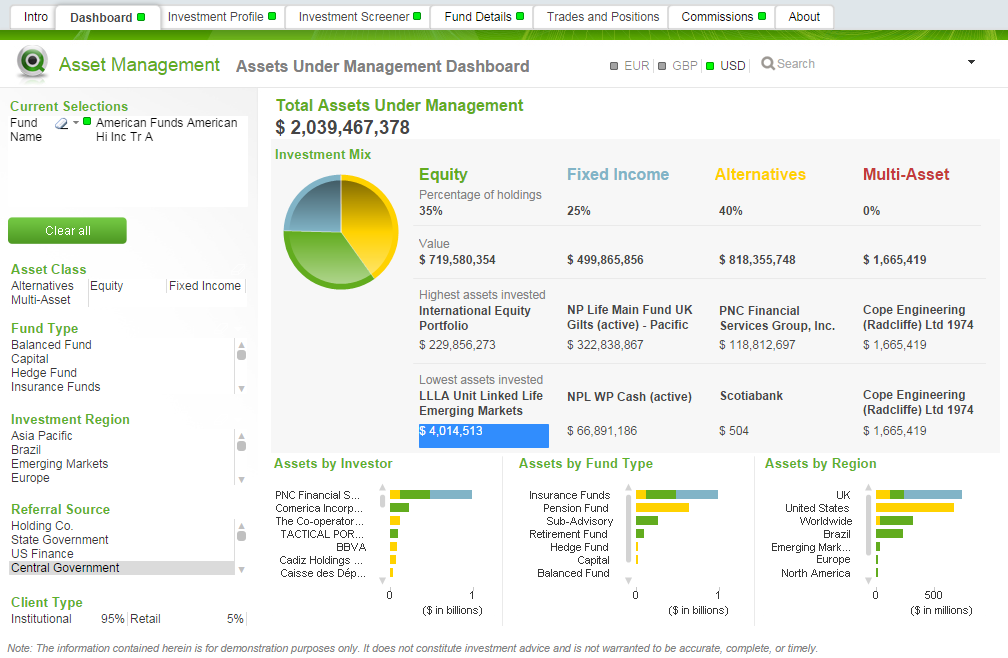
This rare Asset Management demo provides an analysis of assets under management by various dimensions such as asset class, investor, fund type and region. Users can look up funds and their performance and analyze fund details. The source data are from multiple systems such as AUM, Positions, Risk, Returns, Traiding, Portfolio etc. It also contains a capability to look up a group of CUSIPs on finger tips.

The demo application is developed on powerful QlikView Business Intelligence platform which is heavily used in many finance and banking companies.

The Asset Management application contains an Asset Under Management Dashboard to analyze Overall AUM summary by asset class, investor, fund type, as well as region, Investment Profile View, Trades and Positions Analysis View, Investment Screener View (Multiple fund performance and assets under management summary) and Fund Details view where users can access to an Excel-like pivot table ad-hoc analysis of fund details.

In Investment Profile view, when you select a specific fund, you can print the report in PDF with a simple button click.

Asset Under Management Dashboard
Asset Under Management Dashboard Demo

Free access to QlikView Asset Management Dashboard

You can try Asset Management Dashboard demo by accessing the free public demo application. Fill in your name, e-mail and phone to the below form and press submit button. You will receive an e-mail links to web based dashboard (you can also access through mobile devices), a self-executable file for you to try it locally (no QlikView license required) and supporting material such as demo video.

Please fill in Data Analytics with Qlik Demo/App Request Formform (select "Asset Management Dashboard Demo by QlikView Business Intelligence Platform" in dropdown).

Retailer POS Data Analysis Dashboard by QlikView Business Intelligence Platform

Retailer POS Data Analysis Dashboard demo is designed to give visibility into the Retail environment for Consumer Products companies. The source of data is the Retailer who makes information available from their store EPOS and depot systems to the Consumer Goods company.

This demo gives any retailers a picture of product stock levels in store, depot and in transit, as well as sales analysis. The app supports you in you efforts to deliver improved product availability through allowing your organization to reduce out-of-stocks and lost sales potential, as well as identifying potential alternative sources of replenishment.

The POS Data Analysis is developed on powerful QlikView Business Intelligence platform and utilizes its associative features as well as state-of-the-art GUI. Over 3,000 Retail and Wholesale
Distribution companies globally rely on QlikView to empower business users and decision-makers today, by providing access to on-demand analysis, insights and business discovery.

The application contains several views : Dashboard, Item Analysis, Store and Depot Analysis, Growth Analysis, Days on Hand Analysis, Distribution Analysis and Item Store Mix Analysis.

Below, there are some screenshots from the dashboard application. Below the screenshots you can access the demo package composed of link to online Retailer EPOS Data Analysis application, a self-executable version of the same application and a video demo.

QlikView Retailer POS Data Analysis Dashboard View
Retailer POS Data Analysis Dashboard View


Retailer POS Data Analysis Store and Depot View has Google maps integration
Free access to QlikView Retailer POS Data Analysis Dashboard

You can try Retailer POS Data Analysis demo by accessing the free public demo application. Fill in your name, e-mail and phone to the below form and press submit button. You will receive an e-mail links to web based dashboard (you can also access through mobile devices), a self-executable file for you to try it locally (no QlikView license required) and supporting material such as demo video.


Get Acess to Free Copy of Retailer EPOS Data Analysis Dashboard
Name :
E-mail :
Phone :

Wednesday, September 17, 2014

Qlik Sense vs QlikView

Qlik has finally released its long awaited Qlik Sense platform on 17th September 2014. Qlik Sense is a next-generation self-service data visualization application from Qlik (see more here What is Qlik Sense?). According to Qlik, Qlik Sense is built on the QIX Associative Data Indexing engine, the second generation of Qlik’s proven and patented engine technology.

It has some dramatic changes compared to QlikView, such as drag-and-drop visualization, server side dashboard development and distribution, a token based pricing (Qlik Sense pricing), overhauled data extraction, integrated maps, new charts, etc.

Is Qlik Sense new QlikView or QlikView 12? The answer is no. Qlik started the project as QlikView,Next which was implying that the next product will be the new version of QlikView which is on version 11 released in 2011. But Qlik has changed the name to Qlik Sense. It makes sense because this product is different. Not entirely but different.

Conceptually, Qlik Sense and QlikView targets different types of BI. Here is the semi-official explanation of QlikView versus Qlik Sense which is taken from Qlik Community:

QlikView is a tool for situations where you want prepared business applications, i.e. applications created by developers who put a lot of thought into the data model, the layout, the charts and the formula; and deliver the applications to end-users who consume the applications. Qlik calls this Guided Analytics. The end-user has total freedom to explore data, select, drill down and navigate in the information, and can this way discover both questions and answers in the data. The end-user is however limited when it comes to creating new visualizations. This type of situation will without doubt be common for many, many years to come. For more information on Qlik View, refer to our What is QlikView? QlikView Overview post. 
Qlik Sense is a tool for situations where you don’t want to pre-can so much. Instead you want the user to have the freedom to create a layout of his own and in it, new visualizations; charts that the developer couldn’t imagine that the user wants to see. You want Self-service data discovery, which means a much more active, modern, engaged user. In addition, Qlik Sense is much easier to use when you have a touch screen, and is adaptive to different screen sizes and form factors. On the whole, Qlik Sense is a much more modern tool. (Source : Qlik Sense or Qlik View)
To find out more about Qlik Sense you can check Qlik Sense for beginners.

Technically, Qlik Sense seems to use the same data engine and expression syntax in the back-end. Front end is entirely different. But what would be the road map than? Would Qlik Sense and QlikView merge? There is no official roadmap for now but here are sum hints for the future from Henric Cronström, VP for Product in QlikView:

One of the main goals for Qlik Sense was to have one unified client that could run on anything  (=html5). Another goal was to generalize the chart drawing code, so that more graph types could be implemented (=extensions). A third goal was that the client needed to be adaptable to screen sizes and form factors.

These three goals meant total incompatibility with the existing C++ client, and - unfortunately - only a partial backward compatibility. So, we had to start developing from scratch, but to re-implement all functionality from QlikView 11 in a new tool would take a very long time. And, we just haven't done it yet...

I am not allowed to tell you what we have planned for the future, but I can see several possible scenarios: Merge the two products. Or, QlikView disappears because Qlik Sense is so much better. Or, the two products continue in parallel: QlikView survives and flourishes since it is much more flexible and allows for a much greater customization and Application building.

We will see. I can only promise that Qlik will listen to the customers and make decisions based on the feedback. (Source : Qlik Sense or Qlik View)
What I understand (as many does) from this post is that Qlik is actually working to merge both products but it is still WIP. It seems very likely that both products will merge since Qlik also did not made any major upgrade to its now aging QlikView 11. Maybe QlikView 12 will never be a reality and instead we will see a new Qlik Sense version (a server) which handles all QlikView and Qlik Sense applications on a single platform.


A must have QlikView reference.

Qlik Sense for Beginners

What is Qlik Sense?

Qlik Sense is a next-generation self-service data visualization application from Qlik, a leading data discovery platform provider. Launched on September 17th 2014, Qlik Sense empowers everyone to easily create a range of flexible, interactive visualizations that drive exploration and discovery through intuition.

Qlik Sense is a new product and is not QlikView 12. So now basically Qlik offers two BI platforms: Qlik Sense and QlikView. You can read more about the difference between Qlik Sense and Qlik View : Qlik Sense vs Qlik View.

Qlik Sense is built on the QIX Associative Data Indexing engine, the second generation of Qlik’s proven and patented engine technology. Associative Data Indexing allows people to explore data relationships across many sources that would otherwise be hidden in hierarchical or query-based approaches. Qlik Sense drives faster time to insight with intuitive exploration, smart search, and smart visualizations. It broadens knowledge sharing with data storytelling and mobility. And, it promotes accuracy and reliability through enterprise governance capabilities that make it truly world class. Qlik Sense brings out the business analyst in everyone, taking self-service to a new level of power and flexibility, so that businesses are more informed and capable of acting and reacting faster.

Qlik built Qlik Sense to deliver broad value to everyone in an organization, whether working individually, in teams, or globally. With Qlik Sense, users of all types and skill levels get the most flexible, modern solution for self-service data visualization and exploration. And, IT organizations no longer have to trade governance and performance to provide it. Whether simply consuming, exploring and analyzing, creating visualizations, or collaborating – Qlik Sense provides advanced capabilities that delight and empower everyone.

Qlik Sense Overview Video

Associative Data Indexing

The QIX (Qlik Index) engine is the second generation of the proven and patented engine technology that has powered Qlik products for the last decade. It provides associative data indexing and dynamic calculation that empower people to naturally explore using their intuition. Associative data indexing exposes relationships in complex, multi-source data sets that would otherwise be hidden in  hierarchical or query-based approaches. Users benefit from this feedback every time they make selection or search, allowing them to gain understanding and take next steps.

Self-Service Visualization and Discovery

Qlik® Sense offers a cutting edge visualization and discovery experience in a smart, responsive, HTML5 client that allows people to quickly explore information and gain critical insights. Qlik Sense is built to promote the use of human intuition in all areas of the user experience.

Intuitive Exploration and Discovery

Exploration in Qlik Sense is unmatched. People can ask questions anywhere using simple, natural interactions such as selection and search, without restrictions or boundaries. The QIX engine instantly responds after each click, recalculating all analytics and revealing data relationships through easy to understand color cues – green (selected), white (associated), and gray (unrelated). This empowers users to follow their own paths to uncover insights and blind spots across many data sources that would otherwise have been overlooked.

Global Smart Search allows users to search the entire data set using keywords to uncover insights and relationships. Qlik Sense automatically displays the dimensions where the desired values match. And, if multiple values are entered, Qlik Sense will reveal not only the matching dimensions but also the relationships that exist between the values, ranking the results by the strength of the associations. This provides immediate insight regardless of where information is located.

Smart Visualizations

Smart visualizations in Qlik® Sense offer new, innovative techniques for conveying meaning in data. They feature advanced summarization of information, intelligent use of color gradients, and responsive design that adapts information based on screen size. And, because visualizations are automatically integrated with the QIX engine, they are fully interactive and respond to changes in context from anywhere in the app.

User Driven Creation

With Qlik Sense, everyone becomes a business analyst. People no longer have to wait for reports or changes to analysis. They can simply drag and drop to create – without having to wire objects together or write complex SQL queries. Creation in Qlik Sense is progressive; people only get the level of sophistication they want and need. Governed, centralized libraries of data, metrics, and objects facilitate sharing and re-use and promote consistency and accuracy. And, users can quickly load and combine their own data from multiple sources without the need for scripting.

Sharing of Knowledge and Insights

Qlik® Sense is built for people and place, allowing users to share analyses and insights, and work collaboratively in both office and mobile settings.

Collaboration and Communication

Groups and teams can easily collaborate in Qlik Sense to make better decisions. A centralized information hub offers streams of content for different topic areas or workgroups, allowing people to locate valuable content fast, or share relevant analyses for others to use, in an organized controlled manner.

Interactive Data Storytelling allows people to use analytics to create and present guided stories, rich with narrative and graphics, to communicate insights and facilitate discussion. Multiple stories can be created to offer different points of view. And direct, in-context access to live analysis allows for immediate answers to follow-up questions that arise, reducing delays in decision making.

Anywhere, Anytime Mobility

Qlik Sense is inherently mobile, built from the ground up for mobility. Users get full capabilities on any device, including exploration, analysis, creation, and collaboration. A unified, touch based HTML5 client provides intuitive operation, and responsive design intelligently adapts visualizations, data, and functionality to create the best possible experience on any device. With Qlik Sense, people can instantly solve problems anywhere, anytime they arise.

Broad Adoption and Organizational Intelligence

Qlik® Sense offers developers and IT administrators the ideal set of approaches to build, deploy, and govern information and analytics environments. And it does this while ensuring business users retain the flexibility and self-service agility they need.

Customization, Extension, and Data Integration

Qlik Sense can be fully customized to meet unique business needs, offering a complete set of open and standard API’s for building rich analytic apps, embedding visualizations into existing solutions, and extending the functionality of Qlik Sense for new types of visualizations and objects. And these capabilities can be utilized by developers with standard technology skill sets such as HTML5, JavaScript, and .NET.

Qlik Sense offers robust data integration, allowing organizations to cleanse, transform, and unify multiple disparate data sources without requiring external tools or data repositories. Qlik Sense can connect to and combine virtually any data source, including spreadsheets, databases, operational systems, ERP, and web sources. And with Direct Discovery, resident big data sources such as Hadoop, Teradata, and Cloudera can be integrated without requiring data to be loaded into memory.

Enterprise-Class Governance and Performance

With Qlik Sense, organizations benefit from enterprise capabilities not seen in standalone visualization tools. This allows organizations to offer the flexibility of self-service discovery without having to trade-off management, governance, security, or scalability.

The Qlik Management Console (QMC) offers a central point of management and monitoring for all areas of Qlik Sense, including multi-geography deployments. The QMC provides a large set of configuration options for content and resources that drive quicker deployments, efficient and flexible license management, and proper use of applications, objects, and data. It’s web based, responsive, and touch enabled for access on any device.

Qlik® Sense offers a centralized, flexible rules-based security model which provides customized, robust protection for all areas of the product. Administrators can define security rules based on users, actions, resources, and the environment, for all areas of the product. Governed, centralized libraries help to ensure consistency and accuracy of data and analytics across the organization. And dynamic data reduction provides granular control over information access down to the row and column level.

Qlik Sense is built using an elastic scaling architecture that allows for seamless deployment and expansion across geographies. It includes a Deployment Management Console that allows for rapid setup and management of local and cloud environments to support greater capacity and performance. And with the QIX engine at its core, Qlik Sense scales to high numbers of concurrent users and large data sets, offering industry leading high-speed dynamic calculation and performance.

Qlik Sense Pricing

Qlik Sense is available from 17th September 2014. Qlik Sense pricing is also completely overhauled : Qlik has also introduced a new, more flexible token-based licensing model for Qlik Sense to provide greater flexibility for license management. Qlik Sense tokens can be allocated to named users, or leveraged across multiple login sessions for one or more users. With the token-based licensing model, customers can deploy multiple servers, across multiple geographies, to optimize for performance and availability without paying any additional costs.

Thursday, September 11, 2014

Swiss Health and Accident Insurer Helsana choses QlikView

Helsana Group, a leading health and accident insurer in Switzerland, will use uses QlikView Business Intelligence platform to consolidate and analyze data from Teradata, Microsoft and Oracle data warehouses. QlikView will enable Helsana users to perform quick and easy data analysis in the areas of sales, management control and information management.

Helsana required a dynamic analysis tool which is alternative to their existing and cumbersome reporting. Traditional business intelligence solutions are too complex and creates a lot of extra work for the IT department so the company turned to an easy to use and flexible QlikView.

QlikView enables business users to assemble data from multiple sources, explore it, make discoveries, and uncover insights that enable them to solve business problems in new ways. QlikView works the way the mind works. Users conduct searches and interact with dynamic dashboards and analytics from any device. They ask and answer streams of questions on their own and in groups and teams. They forge new paths to insight and decision.

QlikView will connect to existing Teradata, Microsoft (SQL Server), and Oracle datawarehouses which hold all of the data and consolide all of the data sources into a single view, allowing users to quickly and easily track and analyze all of their relevant metrics. The original QlikView deployment was as a management information system, however the organization later chose to expand the solution into their sales organization to perform critical sales analysis. Today, all major KPIs in the sales department are tracked through Helsana’s sales cockpit, powered by QlikView. As an added bonus, Helsana benefits from the synergies of the management information system and sales management now that they are all run on a common platform.

A screenshot from an insurance dashboard running on QlikView platform.
"We wanted a flexible BI solution for standard reporting and ad hoc queries. The key was finding a solution that allowed us to control and analyze live data company wide,” said Harald Roshardt, Head of Analysis & Reporting at Helsana. “QlikView is not only more cost effective than an SAP or IBM Cognos solution would have been, but it also allows us to obtain insights into our current sales activity and analyze the data in seconds. This is all without going through the laborious, manual process we had previously.”

“Helsana is a great example of how the use of QlikView can start in one part of the organization and then spread to other departments to create additional value,” said Chris Christy, National Healthcare Market Director, Qlik. “By enabling business users to manage analytics on their own, QlikView allows organizations to scale their BI deployments in a way that makes sense for their organization, without bogging down the IT department.”

For a detailed overview of QlikView platform, refer to our What is QlikView? QlikView Overview post.

Sunday, September 7, 2014

Insurance Dashboard demo by QlikView Business Intelligence Platform

Insurance data analysis can help all types of insurance firms (including property & casualty, life, health, etc) to improve profitability across the board. But to make it happen, insurance companies also need to have the right tool.

This rare Insurance data analysis dashboard (Insurance dashboard in short) is a business and profitability management application for the insurance industry developed on powerful QlikView Business Intelligence reporting platform. The application covers a range of business areas, and presents a compelling story for how a powerful Business Discovery tool can help companies improve profitability across the board.

This application contains the transaction level details of insurance claims and policies. The sample data is on customers, policies, and claims from a midsize insurance carrier. The dashboard allows its users to analyze this year’s performance based on the number of claims and policies as well as loss ratio. Customer mix is captured using a parallel coordinate chart so users can identify the characteristics of customers and their behaviors.

One of the great extras with this dashboard is that it provides both desktop and mobile sheets so the users who prefer mobile BI can also take advantage of it. The sheets that are presented to the user is determined by the device that is used to analyse the data. A document extension is utilized to detect the device and then this populates a variable to hide or show the relevant sheets.

Below are some screenshots from this great insurance dashboard application which is publicly available.

You can try insurance demo by accessing the free public insurance dashboard demo application. Please fill in the Data Analytics with Qlik Demo/App Request Form so we can send you the link to complete package.

The Insurance Dashboard view (see below) gives users an overview of the Insurance data. Key KPI’s are located across the top of the sheet, along with other key metrics and the performance across the bottom.

Insurance Data Analysis Application Dashboard View

Insurance Policies Analysis –The policies view below provides more details around the policy area of the business. This analysis includes a number of different views of the length of membership and avg premium charts using the cyclic drill button. The sheet also contains a key Triangulation report, common in the Insurance industry. You can also filter the data by a number of key dimensions down the left of the sheet.

Insurance Dashboard Policies Analysis
Other analysis views you can find in the dashboard are Claims Analysis, Loss Ratio Analysis (what if analysis) and Customer Mix analysis.

As we have mentioned above this application also demonstrates mobile bi. It contains an optimized design for small devices such as phones. Access this app using your phone to explore the mobile usability (see below).

Insurance Dashboard Mobile Business Intelligence Screens
Insurance Dashboard Mobile BI Screens

Thursday, September 4, 2014

Centralized QlikView Security Management Module - Click2Manage

QlikView is a fantastic business intelligence platform but it does have some limitations when it comes to security management. Although the application is quite secure (it is used in a lot of banks where security is extremely important) but setting up security is cumbersome. QlikView platform by default lacks a single, easy manageable and scalable security module. The built-in security framework is highly manual and script based to setup. Although it is manageable for 50-100 users, security management becomes a real burden for a few hundred to few thousand users. In addition to manageability issues, QlikView default security framework lacks the following:

Role based security setup assignment – Every users security configuration is done separately even a large group of users share the same security configuration where role based security assignment is crucial.

GUI based security configuration – Security configuration in QlikView is script based. Although QlikView Publisher (an add-on product to QlikView Server) offers somehow GUI based security setup, this is still not role based and the Publisher is an expensive addition to the QlikView platform.

Audit trail – Although almost all actions of users in QlikView are logged, security access configuration changes are not logged so there is no way to understand who changed what sort of security configuration

Layered security admin structure – QlikView’s security access manager, ADMIN, can do every changes about security. This prevents defining different levels of security admins to distribute the load of security configuration and creates significant security issues.

Encrypted security setup storage – QlikView does not provide an encrypted security setup storage.

Click2Manage

Click2Manage is a centralized QlikView Security Management Module developed by Singapore based Knowledge Management Solutions. Click2Manage still sits on the standard QlikView security access model in the background but provide a layer on it to overcome its limitations. Click2Manage deploys easy GUI based management interface to create and manage the SECURITY profile for QlikView Security setup. The module:

- Offers a web based GUI
- Stores security access matrix in secured, encrypted SQL database
- Deploys role based security to simplify security management
- Enables row level, field level, sheet level and application level security
- Interact with AD for user authentication and also supports Custom Created Users
- Provides audit logging
- Provides layered security management

Click2Manage offers a web based GUI and security setup features like role based security groups.
Benefits

Easy management of security for hundreds or thousands of users and profiles.Security setup with out of the box tools provided by QlikView server and publisher may be sufficient for 50-100 users, but it becomes labourous and unproductive for a few thousands of users. Click2Manage provides an easy to use, intiutive user interface and modules to overcome this problem.

Single point of QlikView security administration. Click2Manage provides a single point of QlikView security administration for all enterprise dashboards.

Secured Storage of QlikView security setup Click2Manage provides secured storage of QlikView security setup in an encrypted database and managed by a secured administrative environment for organization where IT policies mandate such setups.

Detailed audit reports for QlikView security setup updates Many organizations require strict audit reporting on the changes of QlikView security profile by security administrators. Click2Manage keeps track of all changes to security matrix across all dashboards and when requested produce detailed audit reports.

What is QlikView? QlikView Overview

QlikView is the world’s first associative, in-memory Business Discovery platform which delivers true self-service BI that empowers business users by driving innovative decision-making. QlikView enables business users to assemble data from multiple sources, explore it, make discoveries, and uncover insights that enable them to solve business problems in new ways. QlikView works the way the mind works. Users conduct searches and interact with dynamic dashboards and analytics from any device. They ask and answer streams of questions on their own and in groups and teams. They forge new paths to insight and decision.

QlikView is a single product that has multiple components for use by people in various roles: business users, business analysts / BI application developers, and IT professionals.

QlikView simplifies analysis for everyone. Qlik’s patented technology allows instant, in memory, manipulation of massive datasets on low cost hardware, allowing affordable widespread deployment of sophisticated analytic applications in days.

Using QlikView organizations can gain business value quickly as they develop, modify, deploy, and – most importantly – use business intelligence applications. QlikTech is changing the game in business analysis, the new rules in business analysis are:

  • Fast time to value – customers are live in less than 3 months, and most in 1-2 months.
  • Risk free – available as a fully-functional free trial download
  • Easy to use – end users require no training.
  • Flexible – unlimited dimensions and measures that can be modified in seconds.
  • Integrated – fully integrated business analysis suite – power analysis, sophisticated applications, and simple reporting on a single architecture.
  • Powerful – near instant response time on massive data volumes. 
The QlikView Business Discovery Platform
The QlikView Business Discovery Platform and its components
Qlikview Features and Functionality

One of the keys to QlikView’s success is its unique, award-winning in-memory associative technology. In-memory analysis and reporting means one-click access to visually rich, interactive dashboards anyone can build quickly and modify easily. It enables users to see and know their businesses in new ways and interactively explore data without limits. Now, users can engage their data with blazing speed, resulting in more informed, proactive decisions.

QlikView has consistently demonstrated how it maximizes the efficient use of available memory in advanced 64-bit, multi-core hardware, allowing thousands of users to access billions of data records. QlikView continues to be featured as a premier solution at Intel hardware launches to demonstrate the potential processing power of theirnew and more advanced memory architectures. This further confirms QlikView is an incredibly flexible and highly-scalable BI tool – one available at a fraction of the cost of traditional BI solutions


Patented QlikView In-Memory Associative Technology

QlikView manages associations among data sets at the engine level, not the application level. QlikView stores individual tables in its in-memory associative engine. Every data point in every field is associated with every other data point any where in the entire schema. Datasets can be hundreds of tables with thousands of fields. 

QlikView's associative model versus traditional model
Query-based BI tools separate the application layer from the data layer. This leads to long deployments while expensive developers customize the application layer to manage the specific associations required to answer a particular business question. When the BI application needs to answer a slightly different business question, the application layer must be altered again. This process is time-consuming and expensive. 

QlikView does not use queries.
Benefits of QlikView Associative In-Memory Architecture
In-Memory analysis and reporting drives simplicity and performance -  With an in-memory data model, QlikView allows data to be analyzed at both an aggregate and a detailed level without the time-consuming and costly step of building multidimensional OLAP cubes. In addition, associations between data are automatically mapped in QlikView and respond instantly to user selections. Since data is kept in -memory, the response time of any calculation is lightning fast, even on extremely large data sets analyzed by multiple concurrent users. 

Single architecture for dashboards, analysis and reporting -  QlikView is all about simplicity. It provides all t he features of traditional BI tools in a single architecture. QlikView has ETL functions to extract , transform and load data from one or several data sources (e.g., ERP, text, Excel, and XML). Development is also facilitated by function-rich wizards. QlikView is click-driven and provides state-of-the-art visualization capabilities using dashboard-style gauges, graphs and tables. With QlikView, users quickly find information at their fingertips. 

Visually Interactive User Interface
QlikView is quicker to deploy. - By incorporating all of these BI capabilities into a single architecture, QlikView meets the dashboard, analysis and reporting needs of every organizational user. This approach also makes QlikView extremely fast to deploy. This single solution and architecture approach also makes QlikView easy to upgrade and maintain, providing a low total cost of ownership.

Easy-to-learn, easy-to-use - QlikView’s color-coded, point-and click user interface makes it extremely intuitive and easy-to-learn for any user. Changes to QlikView applications are made in seconds, which makes it easy to respond quickly to the changing BI needs of an organization. 

QlikView Mobile Business Intelligence - Deploy once access anywhere (One QlikView many devices)

QlikView offers a true business discovery in a cross-platform, browser based interface. This means that applications can be built once and accessed on any device, whether it’s a desktop, laptop, tablet, or smartphone. By taking a ‘build once deploy anywhere’ approach, companies can reduce the burden associated with maintaining multiple versions of applications required by native clients for specific platforms. And users benefit from having a single, consistent QlikView experience across devices. 

QlikView Mobile Business Intelligence

QlikView on Mobile benefits from QlikView’s enterprise-proven server architecture. It gives organizations a unique combination of control at the center and flexibility at the edges. Because management and security are server capabilities in QlikView, the same access to applications and data entitlements apply regardless of the device used to access applications. And with a browser-based solution, there’s no dependency on third-party app stores or approval processes, reducing risk and keeping activity inside the firewall.

Benefits of QlikView’s Mobile Architecture
No additional cost - QlikView on Mobile is provided free as part of QlikView server, supporting the iPad, iPad 2 and other mobile devices with HTML 5-capable browsers.

Deploy once access anywhere - QlikView Delivers the same QlikView experience across desktop, laptop and mobile platforms. QlikView recognizes mobile browsers and enables touch functionality as needed. It offers access to a complete set of live data from multiple sources 

Secure and manageable -  QlikView on Mobile provides the security and manageability of QlikView server architecture